First published Changes log
Google Documents Antigravity Offline Only in Its SDK, 24 GB for Gemma 4 26B
Google's documentation says its Python SDK runs Antigravity agents on Gemma 4 through LiteRT or Ollama with no API key or internet once installed. The app, CLI and editors need a sign-in or API key and default to hosted models.
7 min read
- Memory Google recommends for Gemma 4 26B A4B
- 24GBat least; GPU or unified memory
- Approximate one-time LiteRT model download
- 16.8GB
- Conversation cache the LiteRT preset is sized for
- 64Ktokensof 256K the model accepts
As ofSourceGoogle Antigravity SDK documentation, Gemma 4 model card
Google documents Antigravity coding agents that run without an internet connection only for its Python SDK, and Google recommends at least 24 GB of memory for the local model it documents, Gemma 4 26B A4B.
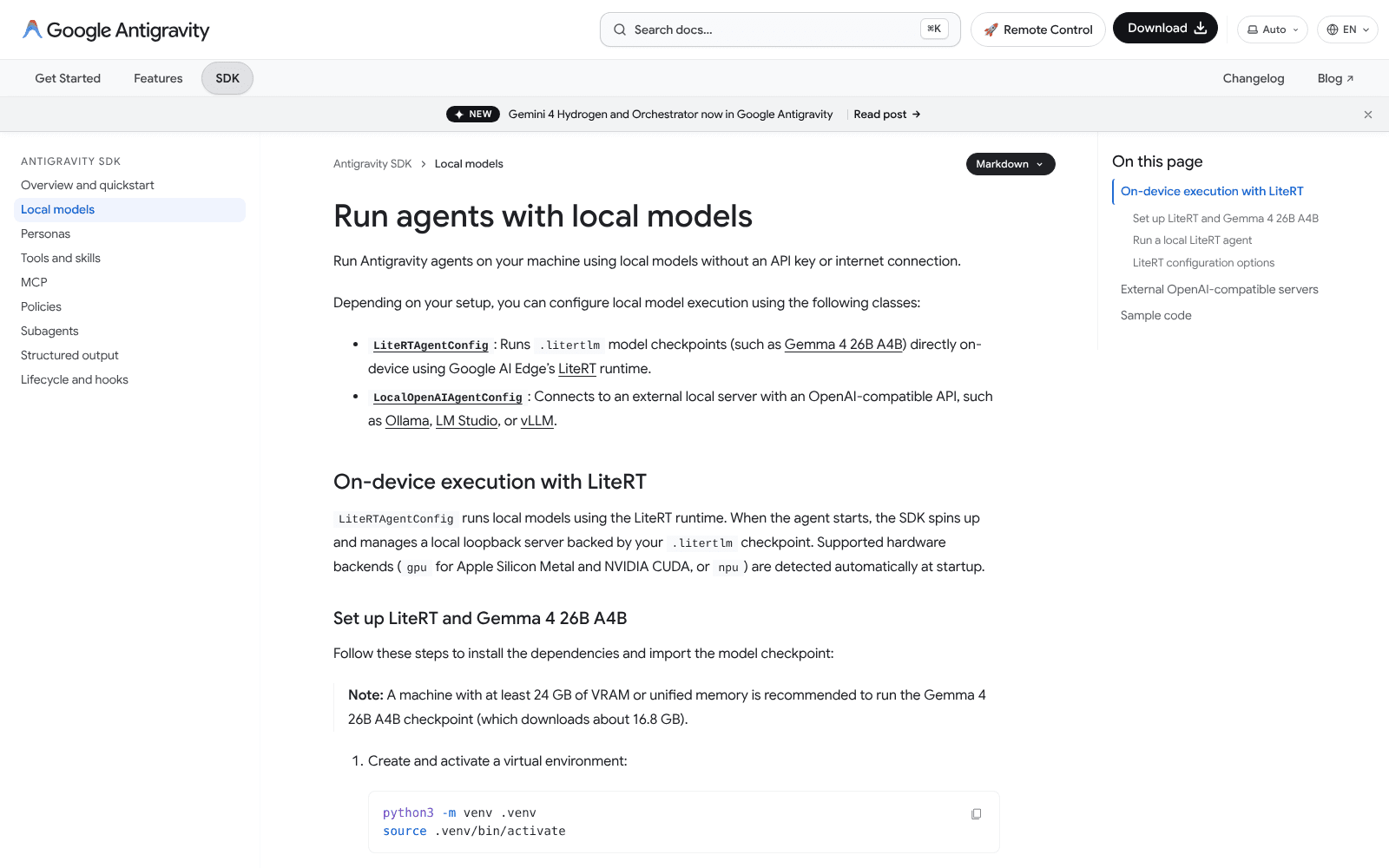
Google's Antigravity SDK page for local models names two routes: LiteRT model files and OpenAI-compatible servers such as Ollama.
Screenshot: Google documentation
Source · Screenshot of Google's public documentation page, shown for news reporting on the product it documents.
The desktop Antigravity App, the agy command-line client, the editor extensions and the standalone Antigravity IDE work differently. They sign in with a Google account, a Gemini API key or Google Cloud credentials and by default send the work to hosted models from Google and partner providers. The CLI can be pointed at another Gemini-compatible address, and the app, CLI and extensions at an enterprise model gateway, which for the CLI may run on the same machine; Google documents neither for local models. Google's plans page says there is currently no bring-your-own-key or bring-your-own-endpoint option for additional rate limits, and the app's model picker lists only hosted models.
What runs offline, and what does not?
Antigravity now comes in five forms: a desktop app, a command-line client, extensions for editors such as VS Code and JetBrains IDEs, a standalone Antigravity IDE and a Python SDK for building agents in code. Google's sign-in documentation describes one shared sign-in layer across them. Only the SDK's documentation describes running a model on your own machine. The model gateways an organization can set up for the app, CLI and extensions are not documented for local models.
The SDK's local models page says agents can run on your machine "without an API key or internet connection". Two settings do the work. LiteRTAgentConfig loads a model file through Google's LiteRT runtime and starts its own small server on the machine. LocalOpenAIAgentConfig connects to a server you already run that speaks the OpenAI API format, such as Ollama, LM Studio or vLLM.
The LiteRT setting also takes a backend choice of graphics chip, neural processor or main processor, an option for multi-token prediction that speeds up generation, and a folder for caching compiled model graphs between launches. Google says the graphics backend is detected automatically at startup on Apple Silicon and NVIDIA hardware.
Nothing equivalent exists in the app. Its model picker offers Gemini 4 Carbon, Gemini 4 Argon, Gemini 4 Hydrogen, Gemini 3.8 Flash and partner models, all hosted, and the plans page lists bring-your-own-endpoint for additional rate limits among the options it does not support. The CLI can add custom models, but its settings page limits them to Gemini-format addresses used with a Gemini API key.
Antigravity's plans page lists bring-your-own-key and bring-your-own-endpoint among options it does not support for additional rate limits.
Screenshot: Google documentation
Source · Screenshot of Google's public documentation page, shown for news reporting on the product it documents.
So Antigravity agents can run fully offline, but Google documents that for only one of its forms. It holds for agents you write in Python with the SDK, once the software and the model are on disk. It does not hold for the app most people download.
What changed, and when?
Local support is recent. Google's changelog shows the SDK gained LiteRT and OpenAI-compatible local connections in version 0.1.6 on July 9, 2026, and support for MCP servers and helper agents on local models in version 0.1.7 on July 14. Google declared local model support official in version 0.1.18 on Sept. 21. Version 0.1.23, released Oct. 26, added caching that reuses the KV cache across turns of a LiteRT conversation.
Smaller fixes filled the gaps between those releases. Version 0.1.10, on Aug. 4, raised the longest answer the local LiteRT server will write by default from 8,192 to 16,384 tokens, so long answers are not truncated, and added guides for running agents on Gemma models.
Done
SDK 0.1.6 adds LiteRT and OpenAI-compatible local connections
Done
SDK 0.1.7 lets local models use MCP servers and helper agents
Done
SDK 0.1.18 makes local model support official
Done
SDK 0.1.23 adds conversation caching for LiteRT models
Done
App 2.32.0 ships with no local model option
InfoQ reported the local support on Oct. 14. It described a Google demonstration in which a cloud Gemini planner split a security-patching job among local Gemma 4 agents. Google said 95 of about 3,400 tokens ran in the cloud, so 97.2% ran locally, and that no source code was uploaded. That is Google's figure from its own demo, not an independent measurement.
The app has not followed. Version 2.32.0 on Nov. 13 added workflow and theme features but no local model option, and the models page says Claude Sonnet 4.6, Claude Opus 4.6 and GPT-OSS-120b leave the picker on Nov. 18. In the app, GPT-OSS-120b is one of the hosted choices, not a local one.
How do you set it up, step by step?
Google documents two routes. The first, LiteRT, needs no server of your own, because the SDK starts one: you install the SDK, download a Gemma 4 model file of about 16.8 GB once, and point the agent at the file. Google recommends at least 24 GB of GPU memory or unified memory for it, 7.2 GB more than the download itself.
The LiteRT route in three commands, with Google's note recommending at least 24 GB of memory and a download of about 16.8 GB.
Screenshot: Google documentation
Source · Screenshot of Google's public documentation page, shown for news reporting on the product it documents.
The second route uses a server you already run. With Ollama, Google's example connects to the model gemma4:26b at the address Ollama uses for its OpenAI-compatible interface, on port 11434; LM Studio's address uses port 1234. Ollama's documentation says the local server ignores whatever API key value a client sends, so no real key is needed.
The Ollama route: LocalOpenAIAgentConfig points the agent at gemma4:26b on the local server at port 11434.
Screenshot: Google documentation
Source · Screenshot of Google's public documentation page, shown for news reporting on the product it documents.
The steps below follow Google's page in order. Steps two to four are typed in a terminal; steps five to seven are settings in a short Python script.
Running an Antigravity agent on a local model
Check your memory
Google recommends at least 24 GB of GPU memory or unified memory for Gemma 4 26B A4B. The LiteRT graphics backend covers Apple Silicon and NVIDIA CUDA.
Create a Python environment
Type python3 -m venv .venv to create it, then source .venv/bin/activate to switch it on.
Install the SDK and LiteRT-LM
While online, type pip install google-antigravity litert-lm to fetch both packages.
Download the model once
Type litert-lm import --from-huggingface-repo=litert-community/gemma-4-26B-A4B-it-litert-lm gemma-4-26B-A4B-it-gpu.litertlm gemma4-26b to download about 16.8 GB once.
Point the agent at the file
In Python, pass the full file path to LiteRTAgentConfig(model_path=...) and start the agent with Agent(config).
Give it one project folder
Set workspaces to your project folder and attach a tool policy so the agent may edit files and run shell commands there. Google's example, policy.allow_all(), permits every tool call.
Or connect Ollama instead
Instead of steps four and five, fetch the model with ollama pull gemma4:26b and use LocalOpenAIAgentConfig with model gemma4:26b and base_url http://localhost:11434/v1, then call .lightweight().
Unplug and run
After setup, Google says no API key or internet is needed. Tools or MCP servers you add that reach a web service still need the network.
Both routes can use a lightweight preset that cuts the agent's built-in tools to core coding operations and shortens its instructions to fit a smaller context window. With LiteRT the preset is switched on automatically; with an OpenAI-compatible server you add it yourself.
Which local model, and how much memory?
Google's example uses Gemma 4 26B A4B, a mixture-of-experts model released under the Apache 2.0 license, with 25.2 billion parameters in all and 3.8 billion active for each token. Google's memory table puts its weights at 14.4 GB at 4-bit precision and 28.8 GB at 8-bit; the LiteRT file in the setup steps is a separate download of about 16.8 GB. All of the parameters must sit in memory, even though only a fraction work at once.
| Model | Parameters | 4-bit weights | 8-bit weights | Ollama 4-bit download |
|---|---|---|---|---|
| Gemma 4 E4B | 4.5B effective | 4.5 GB | 8.9 GB | 6.6 GB |
| Gemma 4 12B | 11.95B | 6.7 GB | 13.4 GB | 8.0 GB |
| Gemma 4 26B A4B | 25.2B, 3.8B active | 14.4 GB | 28.8 GB | 18 GB |
| Gemma 4 31B | 30.7B | 17.5 GB | 34.9 GB | 20 GB |
NoteGoogle's estimates for loading the weights only, with 20% overhead; the conversation cache comes on top. 4-bit is Q4_0 in Google's table and Q4_K_M in Ollama's.
SourceGoogle AI for Developers, Ollama library
As of
Those figures cover the weights alone. The cache that holds the conversation grows with every token, and LiteRT's preset is sized for a 64K-token cache, a quarter of the 256K tokens the model accepts. Agents that keep long sessions open need more, as Voltgrid reported in its look at how much system memory AI agents take.
Smaller sizes fit smaller machines, though Google's SDK notes say local agents currently work best with the 26B A4B file and other model files may not work well or at all. The E4B model needs about 4.5 GB at 4-bit in Google's table, and Ollama lists its 4-bit download at 6.6 GB. On a 24 GB graphics card the 26B model leaves little room for the conversation cache, and a slightly larger model is already out of reach: the 24 GB workstation card in Dell's Pro Max Micro runs an 8B model but not a 27B one. Machines built around large pools of shared memory leave room for longer sessions.
What still needs the internet?
Three things. Installation needs the network: pip fetches the SDK, which depends on a compiled runtime binary delivered through PyPI, and the model comes from Hugging Face or Ollama's library. Any tool or MCP server the agent is given that calls a web service needs the network each time it runs. And Ollama offers cloud models beside local ones: those run on Ollama's servers and need an Ollama account, so an offline setup should use a downloaded tag such as gemma4:26b. Ollama's documentation also explains how to switch its cloud features off entirely.
Works offline, per the docs
- An SDK agent running a LiteRT model file.
- An SDK agent connected to a local Ollama, LM Studio or vLLM server.
- File edits and shell commands inside the workspace you set.
Needs the network
- Installing google-antigravity and litert-lm, and downloading the model.
- The Antigravity App, CLI and editor extensions.
- Tools and MCP servers that call web services, and Ollama cloud models.
Not documented
- Local models in the Antigravity App, CLI, standalone IDE or editor extensions.
- Speed or quality of Antigravity agents on local hardware, measured by a named lab.
What do you give up offline?
The model comes first. In the app, the free plan includes Gemini 4 Hydrogen and Gemini 3.8 Flash on a weekly quota; offline, the agent is only as capable as a model that fits in your memory. Google's own hybrid demo kept the planning on a cloud Gemini model and handed the code work to local agents.
Google's recommended default for coding in the app is not available offline either. Its Orchestrator option pairs a Gemini 4 Carbon or Gemini 4 Argon planner with Gemini 4 Hydrogen doing the edits, and the models page limits it to Google AI Pro and Ultra subscribers.
The interface is second. The SDK is a Python library, so the app's agent manager, built-in browser and change-review panels are not part of a local script. The lightweight preset also trims the tool set, and background helper agents stay off unless you set them up.
Cost is third. The SDK and Gemma 4 are free to download, but a machine with 24 GB of fast memory is not, and sessions longer than the LiteRT preset's 64K-token cache need more memory still. Cloud agents used through an API bill by the token instead, and at list prices that can reach hundreds to thousands of dollars a month for heavy use.
| Measure | SDK with a local model | Antigravity App |
|---|---|---|
| Internet after setup | Not needed, per Google | Required |
| Sign-in | Not needed for local runs, per Google | Google account, API key or Cloud credentials |
| Models | Gemma 4 26B A4B in Google's examples, or a local server | Gemini 4 and partner models on Google servers |
| Memory on your machine | 24 GB recommended for Gemma 4 26B A4B | None for the model |
| Context the setup targets | 64K-token cache (LiteRT preset) | Set by the hosted model |
| Price | Free software and model; you buy the hardware | Free tier with a weekly quota; paid plans for more |
NoteRequirements as Google documents them; no independent measurement of speed or quality is included.
SourceGoogle Antigravity SDK documentation, Google Antigravity plans
As of
Terms in this story
- SDK
- Software development kit: a code library for building programs, here Google's Python package for writing Antigravity agents.
- LiteRT
- Google's on-device runtime that runs model files directly on a computer's graphics chip or neural processor.
- OpenAI-compatible
- A server that answers requests in the same format as OpenAI's API, so one client can talk to Ollama, LM Studio or vLLM.
- mixture-of-experts
- A model design that stores many expert sub-networks but runs only a few of them for each token.
- KV cache
- Memory a model uses to hold the conversation so far; it grows with every token in the session.
- unified memory
- One pool of memory shared by the processor and the graphics chip, as in Apple Silicon and some PC chips.
- MCP
- Model Context Protocol: a standard way to connect an agent to outside tools and data sources.
- Quantization
- Storing a model's weights with fewer bits, such as 4-bit or 8-bit instead of 16-bit, so it needs less memory at some cost in accuracy.
How we counted
Setup steps, requirements and plan terms are from Google's Antigravity and Gemma documentation, Google's changelog and Ollama's documentation, as of Nov. 16, 2026. The 24 GB is Google's recommendation for running Gemma 4 26B A4B, and the 16.8 GB download is from Google's SDK page; the table's memory figures are Google's estimates for weights only, and its download sizes are Ollama's listings. The 97.2% local share is Google's figure from its own demo. No named lab has published speed tests of this setup.
What to watch
Claude 4.6 models and GPT-OSS-120b leave the Antigravity picker
Google's models page sets the removal date for the three hosted models.
Mac Studio M5 Ultra 512GB due
First deliveries of this large unified-memory machine, as Digital Trends reported.
How it compares
Full table| Product | Memory | Bandwidth | AI compute | Measured speed | Price |
|---|---|---|---|---|---|
| ASUS ExpertCenter Pro ET900N G3ASUS (NVIDIA DGX Station GB300 platform) | 748 GB coherent: 252 GB HBM3e (GPU) + 496 GB LPDDR5X (CPU)[1] | 7.1 TB/s (GPU HBM3e); 396 GB/s (CPU LPDDR5X)[1] | up to 20 PFLOPS AI performance (ASUS gives no precision or sparsity label) (sparse)[2] | GPT-OSS-120B MXFP4, vLLM, 512/512, 1-128 streams: 9,280 aggregate output tok/s at 128 streams; 5,023 on 8,192/1,024 (StorageReview, ASUS-supplied unit, no add-in GPU)[3] | $111,999.99 at Central Computers, US (ET900N G3-2SSD-V2, read Nov 8, 2026); no ASUS list price[4] |
| HP ZGX Fury AI StationHP | 252 GB HBM3e GPU + 496 GB LPDDR5x CPU (4x 128 GB SOCAMM); 748 GB unified[5] | 7.1 TB/s (GPU HBM3e); 396 GB/s (CPU LPDDR5x)[5] | up to 20 petaFLOPS FP4 (HP gives no sparsity label) (sparse)[5] | Two-unit cluster with an ASUS ET900N G3 over two 400G DACs: GLM-5.3 NVFP4 5,018 output tok/s at 256 streams, 512/512, vLLM 0.27.1 TP2 with MTP (StorageReview); no single-unit HP result[6] | $132,000.00 on HP Store US (ZGX Fury G1n, 3-yr warranty, no graphics card, 4x 2 TB SED SSDs; Add to cart; read Nov 11, 2026)[7] |
| MSI XpertStation WS300MSI (NVIDIA DGX Station platform) | 252 GB HBM3e GPU + 496 GB LPDDR5X CPU (748 GB coherent)[8] | 7.1 TB/s (GPU HBM3e); 396 GB/s CPU LPDDR5X[8] | — | StorageReview vLLM: gpt-oss-120b MXFP4 9,294 output tok/s at 128 streams (512/512), 5,038 on 8,192/1,024; MiniMax M3 NVFP4 1,041 at 32 streams with EAGLE3-GQA at a forced acceptance length of 3 (best-case)[8] | $99,999.00 'Start From' at Newegg US (model WS300T60L, 2x 2 TB NVMe RAID1), request-a-quote listing sold by Newegg (read Nov 15, 2026)[9] |
| NVIDIA DGX StationNVIDIA (systems built by ASUS, Dell, GIGABYTE, HP, MSI, Supermicro and Exxact) | 748 GB coherent: 252 GB HBM3e (GPU) + 496 GB LPDDR5X (CPU)[10] | GPU HBM3e 7.1 TB/s; CPU LPDDR5X 396 GB/s; NVLink-C2C 900 GB/s between them[10] | 15 PFLOPS FP4 (without sparsity)[10] | gpt-oss-120b MXFP4, vLLM, 512/512 chat workload: 9,280 output tok/s at 128 streams (MSI WS300 9,294), single GB300 (StorageReview, ASUS ExpertCenter Pro ET900N G3)[3] | No NVIDIA list price; lowest US partner listing read Nov 4, 2026: Exxact Valence VWS-158270643 from $98,450 (Tom's Hardware found $94,930 in Aug); Dell Pro Precision with GB300 lists $160,195[11] |
| Supermicro Super AI Station (ARS-511GD-NB-LCC)Supermicro (NVIDIA DGX Station platform) | 748 GB total coherent: 252 GB HBM3e GPU + 496 GB LPDDR5X system[12] | 7.1 TB/s (GPU HBM3E); 396 GB/s (CPU LPDDR5X)[13] | up to 20 PFLOPS FP4 (Supermicro gives no sparsity label; ServeTheHome describes it as sparse FP4)[12] | Qwen3.8 Flash Next NVFP4, vLLM, tool-loop 4,096-in/512-out: several scenarios exceeded 3,000 output tok/s at 32 concurrent users, still rising (ServeTheHome; RTX PRO 2000 installed)[14] | $92,887.47 before tax and shipping on Supermicro's online store (ARS-511GD-NB-LCC-01-G2); about $90,101.05 with a 3% new-customer discount (TechRadar, Sep 1, 2026)[15] |
| NVIDIA RTX PRO 6000 Blackwell Workstation EditionNVIDIA (sold through PNY, TD SYNNEX and workstation makers) | 96 GB[16] | 1,792 GB/s[16] | 4,000 AI TOPS (FP4, with sparsity) (sparse)[16] | gpt-oss-120b MXFP4, stock vLLM, 512/512 chat workload: 3,064 output tok/s at 128 streams (1,169 on 8,192/1,024 prompts); Server Edition at 600W (StorageReview)[17] | $16,000 on NVIDIA's US marketplace (Workstation Edition), listed out of stock[18] |
| Apple Mac Studio (M5 Ultra)Apple | up to 512 GB unified (96 GB on 30-core M5 Ultra; 256 GB or 512 GB on 36-core/80-core M5 Ultra)[19] | 1.2 TB/s[19] | — | GLM-5.3-Flash MLX 4-bit with MTP on TensorFold, ISL 2048/OSL 512: 94.0 tok/s at 0 context, 96.5 at 128K, 79.4 at 512K; TTFT 1.1 s at 0, 66.3 s at 128K (Tom's Hardware, 256 GB M5 Ultra)[20] | $22,299 minimum with 512 GB ($6,799 36-core CPU/80-core GPU M5 Ultra config plus $15,500 memory upgrade; Oct 28, 2026)[21] |
| Corsair FlexPrime V20C Workstation (CSW-9040004-NA)Corsair | 32 GB GDDR6 on the Arc Pro B70 GPU + 32 GB (2x 16 GB) DDR5 system memory[22] | 608 GB/s (GPU GDDR6)[22] | — | Qwen3.8 27B Q4_K_M, llama.cpp server: 19.8 tok/s at 1 request, 33.5 at 4, 35.4 at 8; TTFT 9,005 ms on 8,192-token prompt (StorageReview)[23] | $3,999.99 on Corsair US store (32 GB DDR5, 1 TB SSD; read Nov 15, 2026)[22] |
Show the other 32 machinesHide the other 32 machines
| Product | Memory | Bandwidth | AI compute | Measured speed | Price |
|---|---|---|---|---|---|
| NVIDIA RTX Spark (N1X) PCsNVIDIA (MediaTek collaborated on the custom CPU design) | Up to 128 GB LPDDR5X (20-core CPU / 6,144-core GPU version); up to 64 GB (18-core / 5,120-core laptop version)[24] | Up to 300 GB/s: LPDDR5X-9400 on a 256-bit bus (NVIDIA's product page lists no bandwidth)[25] | — | gpt-oss:20b via Ollama in a Codex CLI coding agent, 64K context: 58.5 tok/s generation, 3 of 4 tasks passed (Dell XPS 16, 20-core N1X, 64 GB; StorageReview)[26] | Laptops from $2,599; pricing and configurations vary by region[27] |
| AMD Ryzen AI Halo (Ryzen AI Max+ PRO 495, 192 GB)AMD | 192 GB LPDDR5X (256-bit)[28] | 273 GB/s[28] | — | — | $7,299.99 for the Linux version (released the week of Oct 12, 2026); Windows version coming soon[28] |
| ASUS Ascent GX10ASUS | 64 GB or 128 GB LPDDR5X-8533 unified[29] | 273 GB/s (8533 MT/s), as listed by StorageReview; ASUS's spec page states no bandwidth[30] | Up to 1 PFLOP FP4 (GB10; NVIDIA's footnote: theoretical, using the sparsity feature). ASUS's pages say 1 petaFLOP / FP4 with no sparsity label (sparse)[31] | gpt-oss-120b, vLLM online serving, equal ISL/OSL: 70 tok/s at batch 1 rising to 680 tok/s aggregate at batch 64 (StorageReview)[30] | $5,999 (128 GB, 1 TB, GX10-GG0010BN, ASUS eShop US, Oct 30, 2026)[32] |
| Dell Pro Precision with GB10 (model FCM1253; launched as Dell Pro Max with GB10)Dell | 128 GB LPDDR5x up to 8533 MT/s onboard (64 GB option also listed)[33] | 273 GB/s (128 GB LPDDR5x, 256-bit)[34] | — | gpt-oss-120b, vLLM online serving, equal ISL/OSL: 68.57 tok/s at batch 1 rising to 670.83 tok/s aggregate at batch 64 (StorageReview)[35] | $7,901.00 (default FCM1253, 128 GB, 2 TB Gen4 QLC); 4 TB TLC SED SSD option +$2,450.00; 64 GB option listed at a $2,150.00 difference (Dell.com US, read Nov 10, 2026)[36] |
| Framework Desktop (Ryzen AI Max+ PRO 495, 192 GB)Framework | 192 GB LPDDR5X-8533 soldered[37] | 273 GB/s (256-bit)[37] | — | — | $6,799 (Max+ PRO 495 192 GB DIY Edition pre-order, Nov 3, 2026; storage not included)[38] |
| GIGABYTE AI TOP ATOMGIGABYTE | 128 GB unified system memory[39] | 273 GB/s (LPDDR5x-8533, 256-bit)[40] | — | gpt-oss-120b, vLLM online serving, equal ISL/OSL: 60.71 tok/s at batch 1 rising to 649.62 tok/s aggregate at batch 64 (StorageReview)[40] | $7,499.99 (128 GB, 4 TB PCIe 4.0) and $9,405.63 (128 GB, 4 TB PCIe 5.0; more options from $7,999.99); 128 GB from $5,999.99 (1 TB) and $6,999.99 (2 TB) at Newegg US, read Nov 9, 2026[41] |
| GMKtec EVO-X5 Pro AI Mini PCGMKtec | 192 GB LPDDR5X-8533 onboard (8 x 24 GB, non-upgradeable); up to 160 GB allocatable as VRAM[42] | Up to 273 GB/s[43] | — | GMKtec Laboratory table: GLM-5.3-Flash UD-IQ4_XS (146.05 GB) decode 17.79 tok/s, prefill 70.18, TTFT 14.71 s; Qwen3.8-Flash-Next ROCmFP4-FAST (93.48 GB) decode 45.08 tok/s[42] | $6,799 (192 GB/2 TB) and $7,099 (192 GB/4 TB), all variants available, GMKtec US store, read Nov 9, 2026[42] |
| HP ZGX Nano AI Station (G1n)HP | 128 GB coherent unified system memory[44] | 273 GB/s (128 GB LPDDR5x)[45] | GB10: up to 1 PFLOP FP4, theoretical, using the sparsity feature; HP and reviewers list 1,000 TOPS FP4 (sparse)[31] | gpt-oss-120b, vLLM online serving, equal ISL/OSL: 69.6 tok/s at batch 1 rising to 722.9 tok/s aggregate at batch 64 (StorageReview)[46] | $7,399.00 at the HP Store for the 4 TB model; $4,759 on Amazon (Notebookcheck, review updated Oct 5, 2026)[47] |
| Lenovo ThinkStation PGXLenovo | 128 GB LPDDR5X unified (256-bit)[48] | 273 GB/s[48] | — | — | US from $5,079 (1 TB base model) on Lenovo's site, per TechRadar's review (Jun 9, 2026); UK from GBP 5,200[49] |
| MSI EdgeMesa N AI+ (128 GB, X-005US)MSI | 128 GB LPDDR5X unified system memory[50] | 273 GB/s[50] | — | — | $7,999.00 (128 GB, 4 TB, X-005US, MSI US store, read Nov 11, 2026)[50] |
| MSI EdgeXpert (MS-C931)MSI | 64 GB or 128 GB LPDDR5x unified (256-bit)[51] | 273 GB/s[51] | 1 PFLOPS FP4 (sparse)[51] | — | No list price; MSI sells via quote (Get a quote)[51] |
| NVIDIA DGX SparkNVIDIA (partner GB10 systems from Acer, ASUS, Dell, GIGABYTE, HP, Lenovo and MSI) | 128 GB; a 64 GB configuration is sold only through OEM partners[31] | 273 GB/s[31] | Up to 1 PFLOP FP4 (theoretical, using the sparsity feature) (sparse)[31] | Qwen 3.8 27B (dense) with multi-token prediction: decode of about 20 tokens/s, with time-to-first-token staying interactive out to the full 262K context.[52] | $6,950.00 (128 GB, 4 TB) on NVIDIA's enterprise marketplace with an Add To Cart button in a copy cached 07:59 UTC on 2026-10-31; stock unverified (listed out of stock on 2026-10-21); 64 GB partner systems from $4,999[53] |
| NVIDIA DGX Spark 64 GBNVIDIA (sold by Acer, ASUS, Dell, Gigabyte, HP and MSI) | 64 GB LPDDR5X unified (two units pool 128 GB over ConnectX-7)[54] | 273 GB/s (256-bit; NVIDIA spec table covers both 64 GB and 128 GB)[31] | 1 PFLOPS FP4 (sparse; NVIDIA spec table covers both memory configurations)[31] | — | from $4,999 (partner systems, Oct 2026; no Founders Edition)[54] |
| Sipeed MaixStationSipeed | 128 GB LPDDR5X (256-bit)[28] | 273 GB/s (Sipeed claim)[28] | 256 TOPS FP4 (native FP4, no sparsity; Axera/Sipeed claim)[28] | — | about $3,999 expected for 128 GB, with Kickstarter launch discounts (Sipeed to Tom's Hardware, Oct 2026)[28] |
| AMD Ryzen AI Halo Developer PlatformAMD | 128 GB LPDDR5x-8000 unified[55] | 256 GB/s[55] | — | gpt-oss-120b, vLLM online serving, equal ISL/OSL 256/256: 222 tok/s aggregate at batch 64 vs 701 on DGX Spark (StorageReview)[56] | $3,999 with 2 TB SSD (Jul 2026)[56] |
| Framework Desktop (Ryzen AI Max+ 395)Framework | 128 GB LPDDR5x-8000 soldered (32 GB and 64 GB options)[57] | 256 GB/s[58] | — | gpt-oss-120b MXFP4 in LM Studio (out-of-the-box setup): roughly 45 tok/s (ServeTheHome; Ryzen AI Max+ 395, 128 GB, Windows 11 Pro)[59] | $3,449 (DIY Edition, Max+ 395 with 128 GB, system only; out of stock, Nov 3, 2026)[60] |
| Acer Veriton GN100 AI Mini WorkstationAcer | 128 GB LPDDR5x coherent unified[61] | — | — | gpt-oss-120b, vLLM, total token throughput: prefill heavy 303.61 to 2,777.56 tok/s; decode heavy 38.38 to 292.41 tok/s (batch 1 to 64, StorageReview)[62] | from $3,999 in North America (announced Sep 3, 2025; prices vary by region)[61] |
| ASRock Industrial AI BOX-A395ASRock Industrial | 128 GB LPDDR5X-8000 soldered[63] | — | — | AgentSTH V7, 32 threads: 15% ahead of the next-closest Ryzen AI Max+ 395 box (single-core within 1%); estimated SPEC CPU2026 int rate: top of a 44% spread across four 395 systems; measured by ServeTheHome, Ubuntu 26.04[64] | — |
| Beelink GTR9 Pro (Ryzen AI Max+ 495, 128 GB)Beelink | 128 GB LPDDR5X-8533 unified (soldered)[65] | — | 132 AI TOPS on Beelink's page; AMD lists the PRO 495 at Overall TOPS up to 132 and NPU TOPS up to 55; no precision stated by either[65] | 4.24 tok/s, LM Studio, Qwen3.8-35B-A3B (Beelink's own figure on its store page; quantization, context, backend and RAM size not stated)[65] | $4,799 (128 GB/2 TB), Beelink store, pre-order (read Nov 13, 2026)[65] |
| Beelink GTR9 Pro (Ryzen AI Max+ 495, 192 GB)Beelink | 192 GB LPDDR5X-8533 unified (soldered)[65] | — | 132 AI TOPS on Beelink's page; AMD lists the PRO 495 at Overall TOPS up to 132 and NPU TOPS up to 55; no precision stated by either[65] | 4.24 tok/s, LM Studio, Qwen3.8-35B-A3B (Beelink's own figure on its store page; quantization, context, backend and RAM size not stated)[65] | $7,399 (192 GB/2 TB) or $7,799 (192 GB/4 TB), Beelink store, pre-order (read Nov 13, 2026)[65] |
| Bosgame M5 MAX AI Mini PCBosgame | 192 GB unified LPDDR5 (soldered); up to 160 GB allocatable to the GPU[66] | — | — | — | $6,199 introductory first-batch pre-order price (192 GB, 2 TB PCIe 4.0 SSD), from Nov 3, 2026, until the first allocation sells out[66] |
| Dell Pro Max Micro (FCM2250)Dell | 24 GB GDDR7 on the RTX PRO 4000 SFF (23.9 GB usable measured) + 96 GB DDR5-6400 CSODIMM system RAM in StorageReview's tested build[67] | — | — | Ministral 3 8B, llama.cpp server (CUDA), 4,096-in/1,024-out: 52.0 tok/s at 1 request, 108.9 at 4; TTFT 1,477 ms (StorageReview, RTX PRO 4000 SFF 24 GB, driver 595.99.02, Ubuntu 26.04.1)[67] | From $1,449.00 on Dell.com US; RTX PRO 4000 SFF 24 GB option +$3,870.00 (read Nov 16, 2026)[68] |
| Dell Pro Precision 9 T4Dell | Up to 2x 96 GB GDDR7 (two RTX PRO 6000 Max-Q) + up to 4 TB DDR5 RDIMM in 16 slots, 8 channels[69] | — | — | MiniMax M2.7 Q4_K_M (129.3 GB) split across 2x RTX PRO 6000 Max-Q: 83.7 tok/s one user, 127.3 peak; 30.3 on one card plus system RAM (StorageReview, llama.cpp b11716, Ubuntu 26.04.1)[69] | From $5,925.00 on Dell.com US; dual RTX PRO 6000 Max-Q option +$30,820.00 (read Nov 14, 2026). StorageReview's tested build (Xeon 698X, 256 GB, 2x Max-Q) about $66,600[70] |
| Dell Pro Precision with GB300 (model FCT6263; announced as Dell Pro Max with GB300)Dell | 252 GB HBM3e GPU + 496 GB LPDDR5X CPU[71] | — | — | — | $160,195.00 (Dell.com US default config FCT6263, read Nov 8, 2026)[71] |
| Gigabyte AI TOP Aero | up to 128 GB LPDDR5X unified[72] | — | — | — | — |
| GMKtec EVO-X2 AI Mini PCGMKtec | 64 GB or 128 GB onboard LPDDR5X-8000 (non-upgradeable)[73] | — | — | Llama 3.3 70B Q6_K Instruct: 3.7-3.8 tok/s generation fully on the Radeon 8060S (about 2 tok/s CPU-only); Qwen3-32B 10.4-10.5 tok/s; 128 GB unit, short prompt, tool not named (ServeTheHome)[74] | $3,499.99 (128 GB/1 TB) and $3,649.99 (128 GB/2 TB), each against a $3,999.99 compare-at price (GMKtec US store, read Nov 11, 2026)[73] |
| HP Z2 Mini G1a WorkstationHP | up to 128 GB unified, up to 96 GB assignable to the GPU, up to 8000 MT/s[75] | — | up to 50 NPU TOPS[75] | gpt-oss-120b GGUF (63.39 GB, full GPU offload) in LM Studio: close to 40 tok/s (StorageReview)[76] | $4,781 list for StorageReview's review configuration; about $3,300 street (B&H top spec with 2 TB SSD at $3,342.65, Aug 2025)[76] |
| Microsoft Surface RTX Spark Dev BoxMicrosoft | 128 GB unified memory[77] | — | up to 1 PFLOP of AI compute (Microsoft; precision and sparsity not stated on the page) (sparse)[77] | — | From $5,999.99 (Microsoft Store US, pre-order, read Nov 1, 2026)[77] |
| MSI EdgeMesa N AI+ (64 GB) | — | — | — | — | from $4,699 in the US (64 GB soldered LPDDR5X, 1 TB PCIe Gen 5)[78] |
| Tenstorrent TT-QuietBox 2 (Blackhole)Tenstorrent | 128 GB GDDR6 on the accelerators + 256 GB DDR5-5600 system memory[79] | — | — | — | $9,999 (Oct 30, 2026)[79] |
| WiCi One (RTX 5060 Ti edition)WiCi | 16 GB GDDR7 VRAM; 1 TB NVMe 4 SSD for TurboStream weight paging (WiCi's claim: NVMe used as working VRAM). System RAM not stated[80] | — | — | — | $2,599 list (WiCi shop, Oct 2026); a $600-off code (WICIWELCOME) is applied at checkout. Early-access price was $1,999 (Notebookcheck, Engadget, Sep 2026)[80] |
| WiCi One (RTX 5090 edition)WiCi | 32 GB GDDR7 VRAM; 4 TB NVMe 5 SSD for TurboStream weight paging (WiCi's claim: NVMe used as working VRAM). System RAM not stated[80] | — | — | — | $9,999 list (WiCi shop, Oct 2026); a $600-off code (WICIWELCOME) is applied at checkout[80] |
Italic values are reported by an outlet or measured by an independent lab; the rest come from the maker. Measured speeds use different models, quantizations and tools, so read each with its source rather than against the others. Voltgrid News does not test hardware itself.
Sources (80)
- [1] ASUS
- [2] ASUS
- [3] StorageReview
- [4] Central Computers
- [5] HP
- [6] StorageReview
- [7] HP
- [8] StorageReview
- [9] Newegg
- [10] NVIDIA
- [11] Exxact
- [12] Supermicro
- [13] ServeTheHome
- [14] ServeTheHome
- [15] TechRadar
- [16] NVIDIA
- [17] StorageReview
- [18] NVIDIA
- [19] Apple
- [20] Tom's Hardware
- [21] MacRumors
- [22] Corsair
- [23] StorageReview
- [24] NVIDIA
- [25] ServeTheHome
- [26] StorageReview
- [27] NVIDIA
- [28] Tom's Hardware
- [29] ASUS
- [30] StorageReview
- [31] NVIDIA
- [32] ASUS eShop
- [33] Dell
- [34] HotHardware
- [35] StorageReview
- [36] Dell
- [37] Framework Blog
- [38] Framework
- [39] GIGABYTE (PR Newswire)
- [40] StorageReview
- [41] Newegg
- [42] GMKtec
- [43] GMKtec
- [44] HP
- [45] HotHardware
- [46] StorageReview
- [47] Notebookcheck
- [48] Lenovo PSREF
- [49] TechRadar
- [50] MSI
- [51] MSI
- [52] Tom's Hardware
- [53] NVIDIA Marketplace
- [54] NVIDIA Blog
- [55] AMD
- [56] StorageReview
- [57] Framework
- [58] Framework Blog
- [59] ServeTheHome
- [60] Framework
- [61] Acer
- [62] StorageReview
- [63] ServeTheHome
- [64] ServeTheHome
- [65] Beelink
- [66] Notebookcheck
- [67] StorageReview
- [68] Dell
- [69] StorageReview
- [70] Dell
- [71] Dell
- [72] Notebookcheck
- [73] GMKtec
- [74] ServeTheHome
- [75] HP
- [76] StorageReview
- [77] Microsoft
- [78] Notebookcheck
- [79] Tenstorrent
- [80] WiCi
Changes
First published.
Sources
- 01OpenAI compatibilityOllamadocs.ollama.comas read on Nov 16, 2026
- 02Google Antigravity SDK Adds Local Model Support for Greater Token Efficiency and Code PrivacyInfoQinfoq.com
- 03Google Antigravity changelogGoogleantigravity.googleas read on Nov 16, 2026
- 04Run agents with local models (Antigravity SDK documentation)Googleantigravity.googleas read on Nov 16, 2026
- 05Gemma 4 model overview and inference memory requirementsGoogle AI for Developersai.google.devas read on Nov 16, 2026
- 06Google Antigravity plansGoogleantigravity.googleas read on Nov 16, 2026
- Desk
- Local AI Desk
- Published
- Sources
- 6 cited
